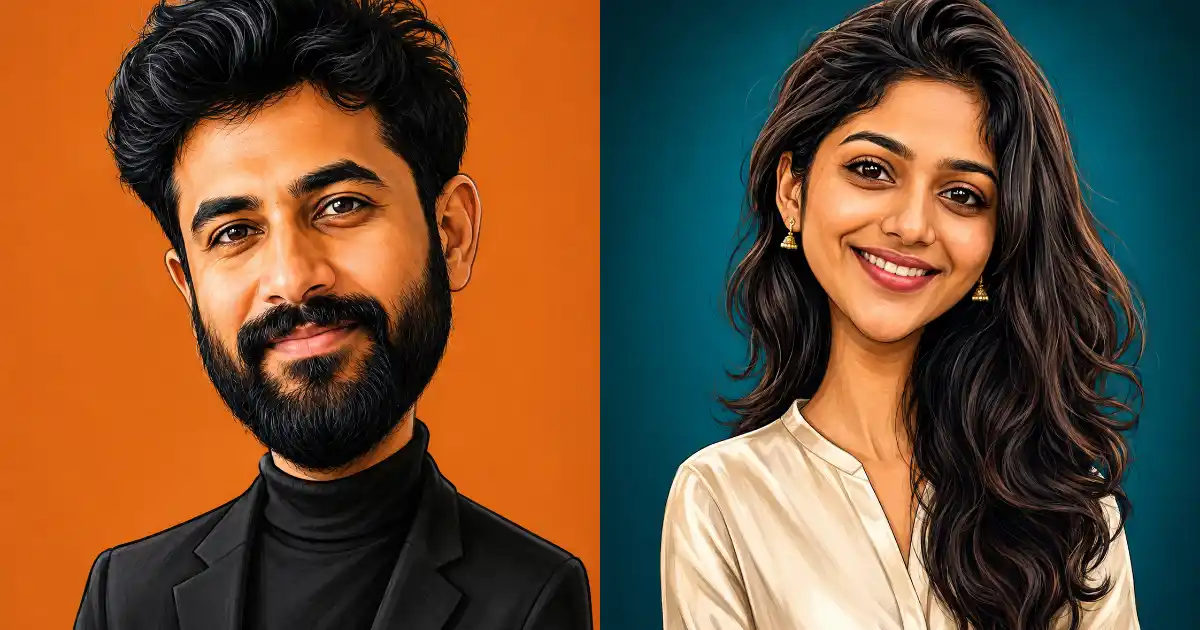
I have been playing around with caricature prompts for a while now, and most of them fail in one of two ways. Either the result looks nothing like the person, or it turns into a goofy cartoon with rubbery skin and clown colors that nobody would actually want to share.
The style I keep coming back to is different. It is the polished, editorial kind of caricature you see from professional digital artists. The proportions are exaggerated, the head is stretched and sculpted, but the rendering is smooth and detailed, and the person still looks like themselves in a way that feels almost flattering.
You only need one prompt for this. Fill in two simple blanks, upload your photo, and you get a caricature that looks like a commissioned piece of art rather than a joke sticker.
What Makes This Style Work
Street artists who draw caricatures do one thing really well. They study your face for a few seconds, find the two or three features that define it, then push those features further while keeping everything else grounded.
Maybe it is a strong jawline, deep-set eyes, thick eyebrows, or a distinctive nose. The exaggeration gives the image character, but the resemblance is what sells it.
The nice part is that you do not have to figure out your own standout features. That can feel awkward, and most of us are honestly the worst judges of our own faces. This template tells the AI to study the photo and pick the defining features itself, just like a caricature artist would.
The other thing that makes this style land is restraint. There is no wacky pose or oversized coffee mug. It is a simple head-and-shoulders portrait with a natural expression, and all the humor lives in the proportions.
How to Use This Prompt
This one is written for ChatGPT. Go to chatgpt.com or open the ChatGPT app, start a new chat, and upload a clear photo of yourself. Paste in the filled prompt and ChatGPT will generate the caricature using its built-in image model.
The prompt also works in Google Gemini if that is what you have. Upload your photo the same way, paste the prompt, and let it generate. I mostly use ChatGPT for this style, since it follows the shading and proportion instructions closely and keeps the resemblance strong when a reference photo is attached.
For the photo itself, use one where your face is well lit and clearly visible. Front-facing shots work best. Group photos, sunglasses, and heavy shadows all make it harder for the model to lock onto your features.
The Caricature Prompt Template
Here is the full template. Everything inside the square brackets is a blank for you to fill in. Delete the brackets when you are done.
Create a polished, artistic caricature illustration of the person in this photo. Study the face carefully, identify the two or three most distinctive facial features that make this person recognizable, and exaggerate those features with taste and skill. Stylize the head with elongated, sculpted proportions, larger than the body and tapering toward the chin, in the manner of a professional editorial caricature. Keep the face clearly recognizable so anyone who knows them can immediately tell who it is, and keep their natural expression from the photo, only slightly heightened. Show them from the chest up in a calm head-and-shoulders portrait pose, facing slightly toward the camera at eye level, wearing [CLOTHING, such as the same outfit from the photo, a black turtleneck under a dark blazer, or a casual denim jacket]. Use a smooth digital painting style with refined linework, soft realistic shading, subtle skin texture, and carefully rendered hair. Place them against [BACKGROUND COLOR, such as a flat muted orange, a deep teal, or a warm beige] as a solid, clean backdrop with no distracting elements. Even studio-style lighting with gentle shadows for depth. Use aspect ratio 4:5.
That is the whole thing. The AI handles the face, and you only decide the outfit and the backdrop.
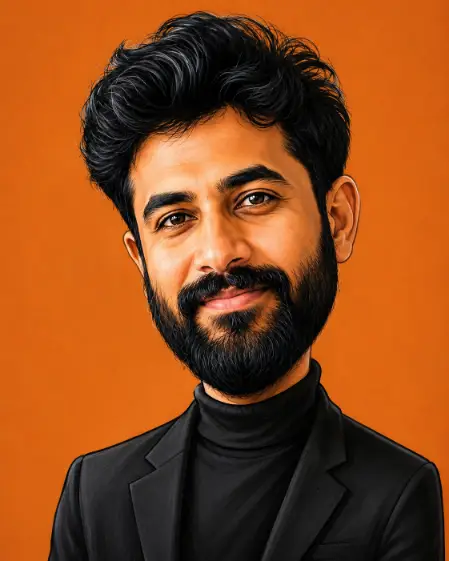
Example Prompt for a Male Photo
Here is the template filled in for a male photo, so you can see exactly how the blanks work.
Create a polished, artistic caricature illustration of the person in this photo. Study the face carefully, identify the two or three most distinctive facial features that make this person recognizable, and exaggerate those features with taste and skill. Stylize the head with elongated, sculpted proportions, larger than the body and tapering toward the chin, in the manner of a professional editorial caricature. Keep the face clearly recognizable so anyone who knows them can immediately tell who it is, and keep their natural expression from the photo, only slightly heightened. Show them from the chest up in a calm head-and-shoulders portrait pose, facing slightly toward the camera at eye level, wearing a black turtleneck under a dark blazer. Use a smooth digital painting style with refined linework, soft realistic shading, subtle skin texture, and carefully rendered hair. Place them against a flat muted orange as a solid, clean backdrop with no distracting elements. Even studio-style lighting with gentle shadows for depth. Use aspect ratio 4:5.
Example Prompt for a Female Photo
And here is the same template filled in for a female photo, with a different outfit and backdrop.
Create a polished, artistic caricature illustration of the person in this photo. Study the face carefully, identify the two or three most distinctive facial features that make this person recognizable, and exaggerate those features with taste and skill. Stylize the head with elongated, sculpted proportions, larger than the body and tapering toward the chin, in the manner of a professional editorial caricature. Keep the face clearly recognizable so anyone who knows them can immediately tell who it is, and keep their natural expression from the photo, only slightly heightened. Show them from the chest up in a calm head-and-shoulders portrait pose, facing slightly toward the camera at eye level, wearing a cream silk blouse with delicate gold earrings. Use a smooth digital painting style with refined linework, soft realistic shading, subtle skin texture, and carefully rendered hair. Place them against a deep teal as a solid, clean backdrop with no distracting elements. Even studio-style lighting with gentle shadows for depth. Use aspect ratio 4:5.
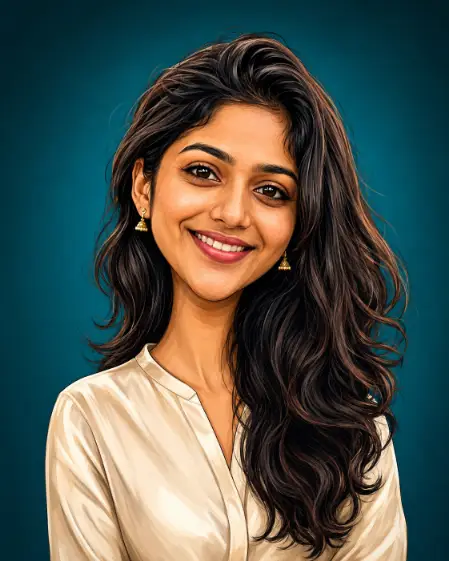
Notice how nothing outside the blanks changed. You only touch the clothing and the background color, and the structure does the rest.
Fill In Each Blank
Clothing. Keeping the same outfit from the photo boosts recognizability, so I use that as my default. A simple swap like a turtleneck and blazer instantly gives the portrait a classic, gallery-ready feel. Avoid busy patterns, since they compete with the face.
Background color. This style lives on flat, solid backdrops, so pick one color and commit to it. Muted orange, deep teal, warm beige, and olive green all work beautifully. Choose a color that contrasts with the clothing so the silhouette pops.
Tips for Better Results
If the result drifts too far from your actual face, add one line at the end of the prompt: keep the eye shape, nose, and skin tone true to the photo. That single sentence pulls the model back toward reality.
If the result is too tame and looks like a plain digital portrait, push the other way. Change exaggerate those features with taste and skill to boldly exaggerate those features, or add a line like stretch the head taller and narrow the chin further.
You can also change the aspect ratio depending on where the image is going. Keep 4:5 for Instagram posts, switch to 1:1 for profile pictures, or use 9:16 if you want a vertical version for stories.
A Few Fun Ways to Use These
This style makes an excellent profile picture. It is distinctive enough to stand out in a feed of regular selfies, but polished enough that it still reads as professional on LinkedIn or a personal site.
They also work well as gifts. A framed print of a friend’s caricature in this style feels like commissioned artwork, and most people have never seen themselves drawn this way.
Start with your own photo first, though. It is the fastest way to see how the AI reads your face and how far it pushes the proportions. Once you get a feel for it, you will be making caricatures of everyone you know.